Commission Tracker Spreadsheet
C$9.00
Buy now
Sales tax, VAT or GST is added at checkout where it applies.
Also sold in our Etsy shop: view on Etsy
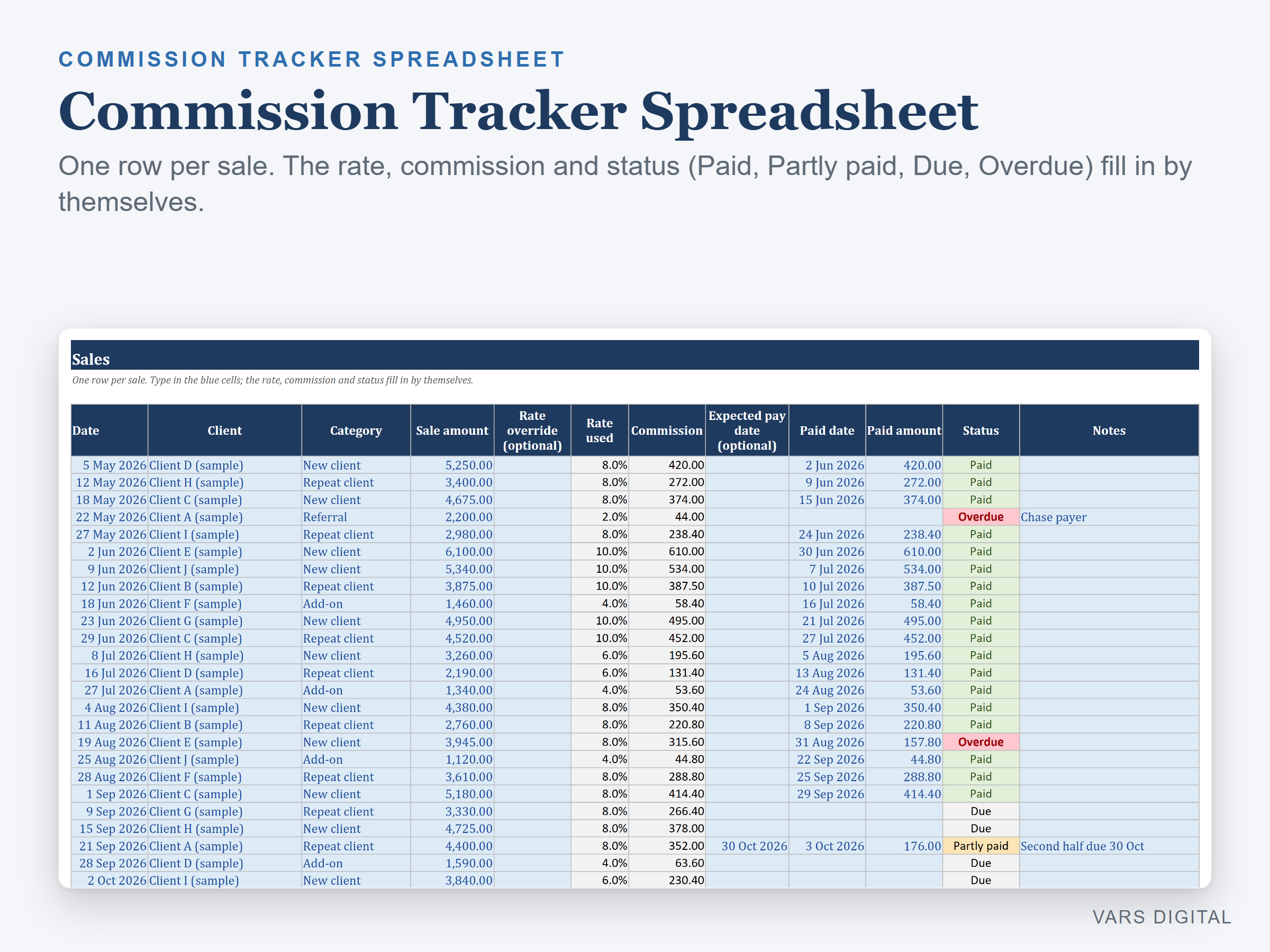
Commission tracker spreadsheet for salespeople, agents and stylists: log each sale and the rate, commission and status (Paid, Partly paid, Due or Overdue) fill in by themselves, with monthly sales tiers, category rates, a payments log, a 12-month summary and a dashboard of what you earned, received and are still owed.
WHAT IT DOES
- Setup tab: your name, the month and year your tracking year starts (any month, so a fiscal year works), a default commission rate, how many days after a sale commission is usually paid, an optional as-of date, a Use tiers switch with up to 3 tiers (monthly sales from, to and rate), up to 10 categories or product types with an optional own rate, up to 30 clients and up to 10 payers (company, supplier, brokerage)
- Sales tab (1,000 rows): date, client, category, sale amount, an optional rate override, rate used, commission, expected pay date, paid date, paid amount, status and notes
- Rate used: your override for that sale, else the category's own rate, else (with tiers on) the rate of the tier that the month's total sales reach, else the default rate
- Status: Paid, Partly paid, Due, or Overdue when the expected pay date (or the sale date plus your usual days) has passed and the commission is not fully paid. Overdue turns red, Partly paid amber
- Payments tab (500 rows): date received, payer, amount, the month it covers and a reference, to match against your statements
- Monthly Summary: 12 months from your start month with sales, number of sales, commission earned, paid and outstanding, average rate, running year-to-date totals, the tier reached and payments logged
- Dashboard: year-to-date sales, commission earned, received and still owed, overdue count and amount, average commission per sale and rate, best month, payments logged vs received, a table by category, a chart of commission earned vs paid by month and your 5 largest unpaid commissions
- The tabs are protected without a password, so formulas don't get typed over by accident (you can unprotect them any time)
WHAT YOU GET
- Commission-Tracker.xlsx (blank, ready for your sales)
- Commission-Tracker-with-Sample-Data.xlsx (a filled-in example: a made-up salesperson with 45 sales over 10 months, tiers on)
- Quick-start guide (PDF)
HOW YOU GET IT
Digital download. After checkout you get a download page right away, plus a receipt by email. Nothing is shipped.
COMPATIBILITY
- Microsoft Excel 2016 or newer (Windows or Mac) and Excel for the web
- Google Sheets: upload the .xlsx to Google Drive, open it, then File > Save as Google Sheets
- Needs a computer or tablet with a spreadsheet app. This is not an app: you type your sales and payments, and it does not connect to your bank, CRM or payer
GOOD FOR
Commissioned salespeople, travel advisors, real estate and insurance agents, salon stylists and their managers who want to see the commission earned on each sale, what has been paid and what is still owed.
PLEASE NOTE
- One tracking year (12 months) per file. For the next year, save a copy, change the year and clear the logs
- Tiers work on the whole month: when the month's sales reach a tier, every sale that month (without an override or a category rate) gets that rate. Plans that pay each tier only on the sales above it need the rate override column
- Commission is the sale amount x the rate, rounded to the cent. Draws, splits, chargebacks and taxes are not built in
- For your own use; please don't resell or share the files
DISCLAIMER
This template is a record-keeping tool, not tax, payroll, legal or accounting advice, and does not replace advice from a qualified or licensed professional (such as an accountant or bookkeeper). Check the figures against your commission plan and your payer's statements before you rely on them.
HOW IT WAS MADE
Designed by VARS Digital with AI-assisted tools. Every formula is checked before release, and the sample file shows each tab working.
QUESTIONS
Email varsdigitals@gmail.com and we'll help you get set up.