Credit Card Tracker
C$8.00
Buy now
Sales tax, VAT or GST is added at checkout where it applies.
Also sold in our Etsy shop: view on Etsy
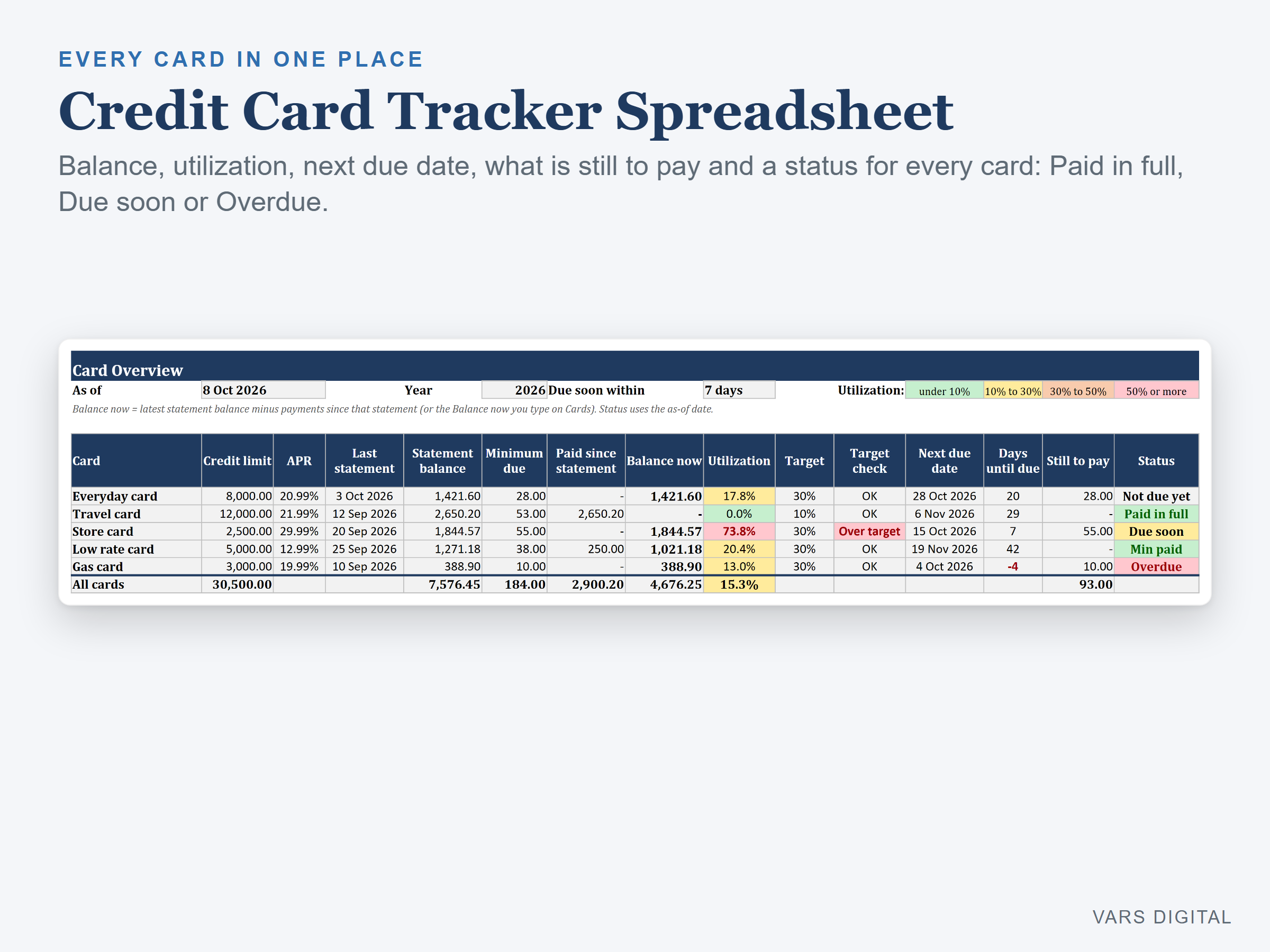
Credit card tracker spreadsheet for keeping every card in one place: log each statement and payment, and see each card's balance, utilization, next due date, what is still to pay and whether it is Paid in full, Due soon or Overdue, with interest, fees and rewards for the year on a dashboard.
WHAT IT DOES
- Cards tab: up to 12 cards with a name, the last 4 digits (optional), credit limit, APR, statement day, due day, annual fee and its month, rewards notes and your own target utilization (30% to start). An optional Balance now column lets you type the exact balance from your card's app
- Statements tab (600 rows): statement date, card (drop-down), statement balance, minimum due, interest charged, fees and rewards earned. A Check column flags a missing date or a card name that is not on the Cards tab
- Payments tab (1,000 rows): date, card (drop-down), amount and a note
- Card Overview: for each card, the last statement, statement balance, minimum due, paid since the statement, balance now, utilization, target check, next due date, days until due, still to pay, status, interest and fees for the year, rewards for the year, and an estimate of the interest per month at the current balance
- Utilization colours: green under 10%, yellow 10% to 30%, orange 30% to 50%, red 50% or more. Cards above your target are marked Over target
- Status for every card: Paid in full, Min paid (at least the minimum), Due soon (due within the days you set, 7 to start), Not due yet or Overdue. Uses today's date, or an as-of date you type
- Dashboard: total balance, total credit limit, overall utilization, available credit, cards over target, overdue and due soon, still to pay, interest and fees for the year, rewards for the year, annual fees per year, the next 5 due dates, a by-card table, a balance by card chart and an interest and fees by month chart
- The tabs are protected without a password, so formulas don't get typed over by accident (you can unprotect them any time)
WHAT YOU GET
- Credit-Card-Tracker.xlsx (blank, ready for up to 12 cards)
- Credit-Card-Tracker-with-Sample-Data.xlsx (a filled-in example: 5 made-up cards with 6 to 9 months of statements and payments)
- Quick-start guide (PDF)
HOW YOU GET IT
Digital download. After checkout you get a download page right away, plus a receipt by email. Nothing is shipped.
COMPATIBILITY
- Microsoft Excel 2016 or newer (Windows or Mac) and Excel for the web
- Google Sheets: upload the .xlsx to Google Drive, open it, then File > Save as Google Sheets
- Needs a computer or tablet with a spreadsheet app. This is not an app: you type the numbers from your statements
GOOD FOR
Anyone with several credit cards who wants every balance, limit, utilization, due date, minimum payment, payment and interest charge in one place, and a clear view of which card needs paying next.
PLEASE NOTE
- Balance now is the latest statement balance minus the payments made since that statement. New purchases since the statement are not counted unless you type the balance from your card's app in the Balance now column
- Interest and fees come from the statements you type in; the interest per month figure is only an estimate (balance x APR / 12)
- This is a tracker, not a payoff planner. For a snowball or avalanche payoff plan, see our Debt Payoff Tracker
- For your own use; please don't resell or share the files
DISCLAIMER
This template is a record-keeping tool, not financial or credit advice, and does not replace advice from a qualified or licensed professional. It does not connect to any bank or card, does not make payments and does not change your credit score. Check the amounts and due dates on your card statements before you rely on the totals.
HOW IT WAS MADE
Designed by VARS Digital with AI-assisted tools. Every formula is checked before release, and the sample file shows each tab working.
QUESTIONS
Email varsdigitals@gmail.com and we'll help you get set up.