Employee Schedule Template
C$9.00
Buy now
Sales tax, VAT or GST is added at checkout where it applies.
Also sold in our Etsy shop: view on Etsy
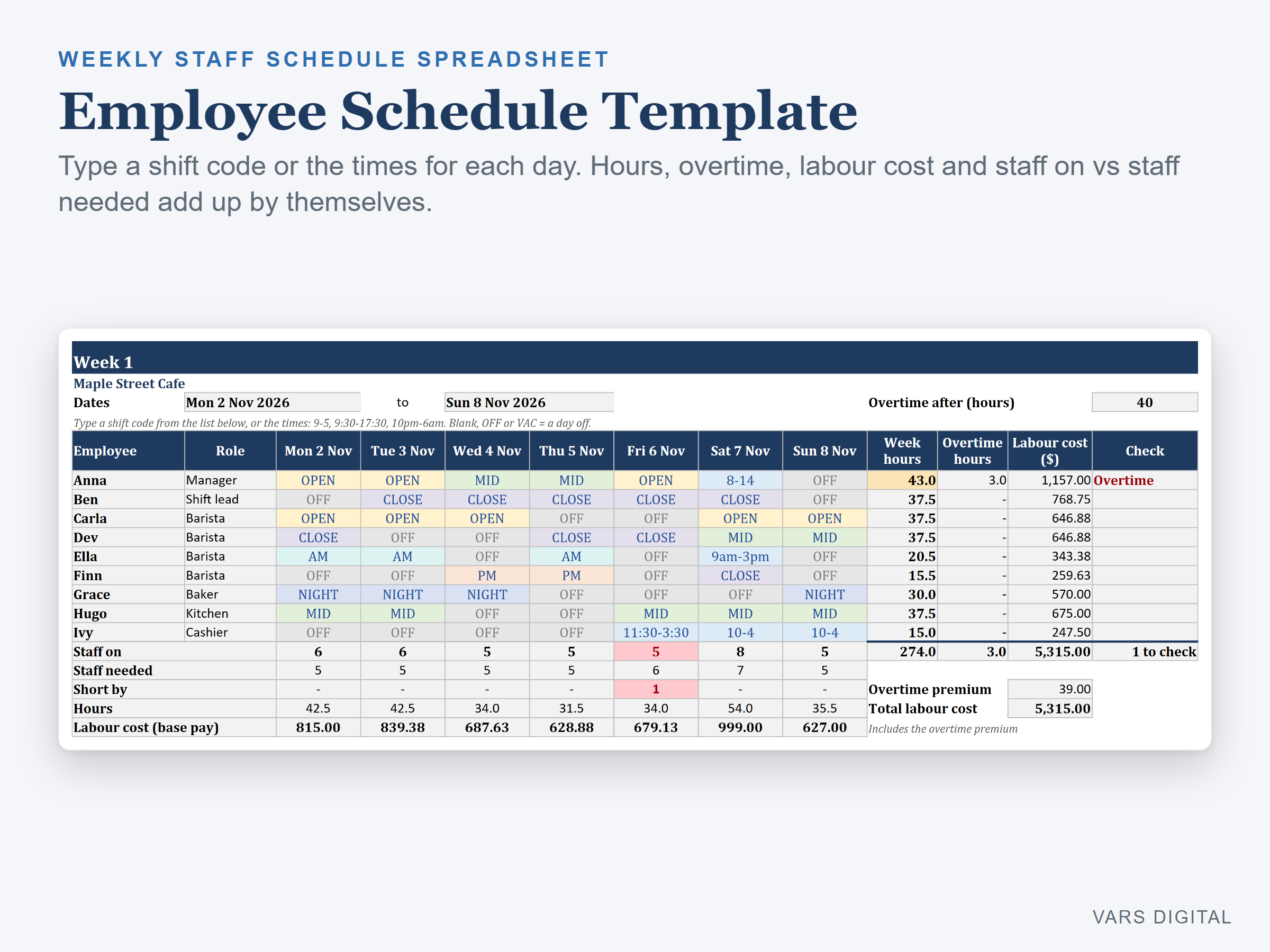
Employee schedule template for planning your team's shifts week by week: type a shift code (OPEN, CLOSE, NIGHT) or the times (9-5, 10pm-6am) for each person and day, and see hours, overtime, labour cost and staff on vs staff needed add up by themselves, with a dashboard for 4 weeks.
WHAT IT DOES
- Setup tab: business name, the first day of week 1 (any day of the week), a currency symbol for the labels, overtime after a number of hours per week (40 to start), an overtime pay multiplier (1.5 to start), an unpaid break for typed shifts, staff needed for each day of the week, up to 25 employees with role, hourly rate and an optional max hours per week, and up to 12 shift codes with start, end and unpaid break
- Week 1 to Week 4 tabs: one row per employee, one cell per day. Type a shift code or the times (9-5, 9:30-17:30, 9am-5pm, 22-6, 10pm-6am). Shifts that end after midnight are counted on the day they start. Dates fill in from the first day you choose
- For each employee: hours by day, week hours, overtime hours, labour cost (hours x rate plus the overtime premium) and a Check column that flags Overtime, Over max (above their own max hours) or a shift to check
- For each day: staff on, staff needed, short by (turns red), hours and labour cost
- Colour-coded schedule: the first 6 shift codes get their own colour and days off turn grey, so the week reads at a glance. Each week tab prints on one landscape page to post for your team
- Dashboard: total hours, total labour cost, overtime hours and premium, average cost per week, shifts scheduled, days short of staff, a table by week, one week in detail (pick the week) with staff on vs needed, each employee's hours and cost, a labour cost by day chart and an hours per employee chart
- The tabs are protected without a password, so formulas don't get typed over by accident (you can unprotect them any time)
WHAT YOU GET
- Employee-Schedule.xlsx (blank, ready for your team, with 8 starter shift codes)
- Employee-Schedule-with-Sample-Data.xlsx (a filled-in example: a made-up cafe with 9 employees over 4 weeks)
- Quick-start guide (PDF)
HOW YOU GET IT
Digital download. After checkout you get a download page right away, plus a receipt by email. Nothing is shipped.
COMPATIBILITY
- Microsoft Excel 2016 or newer (Windows or Mac) and Excel for the web
- Google Sheets: upload the .xlsx to Google Drive, open it, then File > Save as Google Sheets
- Needs a computer or tablet with a spreadsheet app. This is not an app: you type the shifts, and it does not send schedules to your team
GOOD FOR
Small business owners and managers who plan weekly staff shifts: cafes, restaurants, retail shops, salons, cleaning crews, clinics and other small teams of up to 25 people who want hours and labour cost totals with the schedule.
PLEASE NOTE
- Four weeks per file. For the next 4 weeks, save a copy, change the first day of week 1 and clear the shifts
- Overtime is counted per week only (hours above the number you set). Daily overtime, holiday rates and break laws are not built in
- Labour cost is hours x hourly rate plus the overtime premium. It does not include taxes, benefits or other payroll costs
- For your own use; please don't resell or share the files
DISCLAIMER
This template is a scheduling and planning tool, not legal, payroll or labour-law advice, and does not replace advice from a qualified or licensed professional (such as an accountant, payroll provider or employment lawyer). Check your local overtime, break and pay rules, and check your totals, before you rely on them.
HOW IT WAS MADE
Designed by VARS Digital with AI-assisted tools. Every formula is checked before release, and the sample file shows each tab working.
QUESTIONS
Email varsdigitals@gmail.com and we'll help you get set up.