Gantt Chart Template
C$12.00
Buy now
Sales tax, VAT or GST is added at checkout where it applies.
Also sold in our Etsy shop: view on Etsy
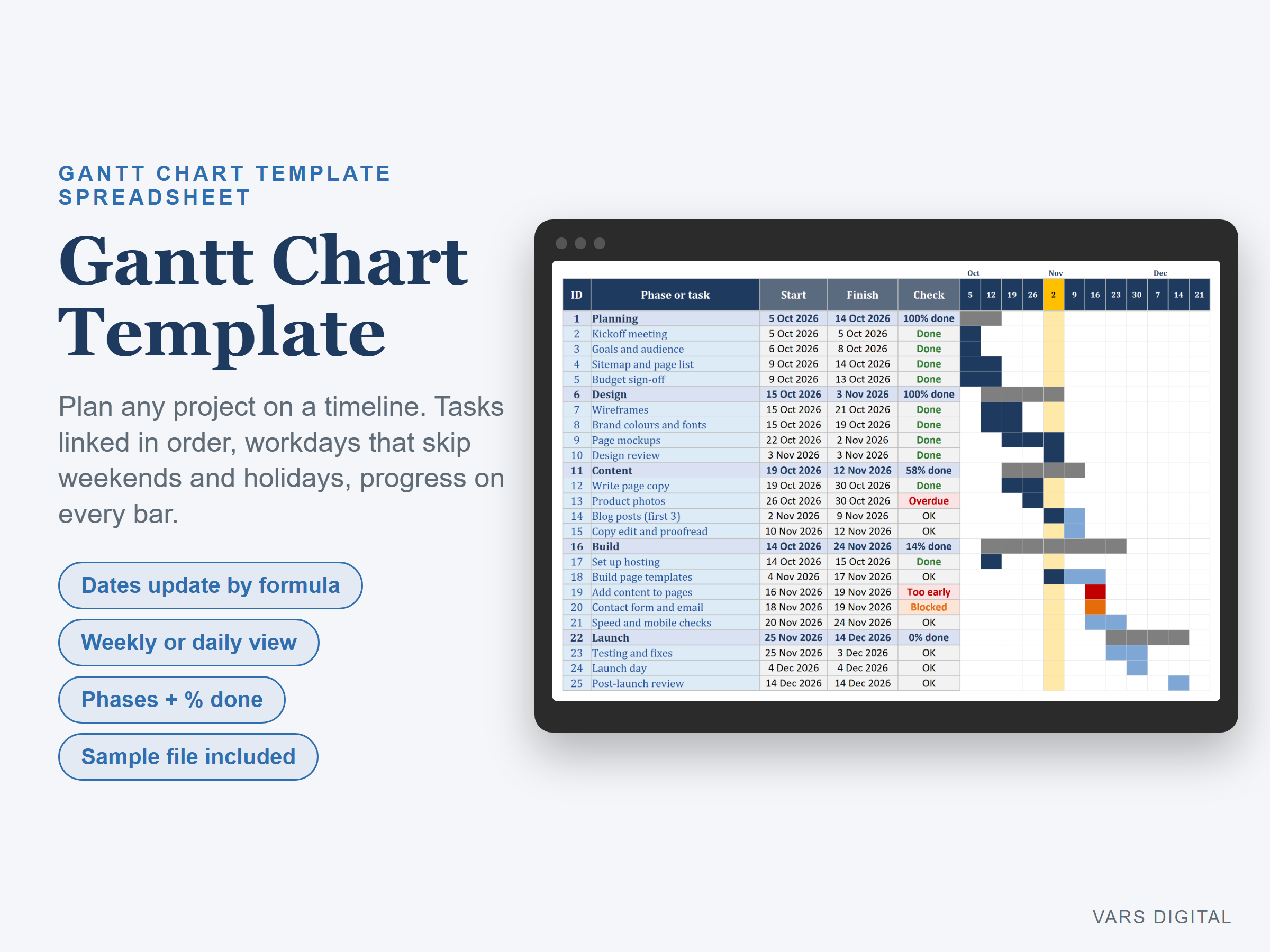
Gantt chart template for Excel: plan any project on a timeline without project software. List your phases and tasks, give each task a length in workdays and say which task it follows. Start and finish dates, bars, progress and schedule checks all update by formula.
WHAT IT DOES
- Gantt tab: ID, phase or task, type (phase or task), owner, after ID, lag, workdays, planned start, start, finish, % done, status and a check column, for up to 100 rows
- Dependencies: a linked task starts the next workday after the task it follows, plus any lag. Change one task and every task after it moves
- Workdays skip weekends and your own holidays (list up to 30 on the Setup tab)
- Phases: add a phase row and it takes its start, finish and % done from the tasks below it
- Bars show progress: dark for the part that is done, light for the part still to do, grey for phases
- Weekly or daily timeline: pick Weeks or Days at the top of the sheet. 36 columns at a time, with a Timeline from date to scroll. Today is marked in yellow, and the daily view shades weekends and holidays
- Status drop-down (Not started, In progress, Done, Blocked) and an Owner drop-down from your team list
- Schedule checks: the sheet flags tasks that are overdue, blocked, planned to start before the task they follow is done, or linked to a task that is not listed above
- Dashboard: project start and finish, total workdays, workdays left, tasks done, work done (weighted by workdays), overdue tasks, schedule issues, blocked tasks and tasks finishing in the next 7 days, plus every phase with its dates and % done and a list of what needs attention
- Formulas only: no macros and no add-ins
WHAT YOU GET
- Gantt-Chart-Template.xlsx (blank)
- Gantt-Chart-Template-with-Sample-Data.xlsx (a filled-in example: a website launch with 5 phases and 20 tasks over about 10 weeks)
- Quick-start guide (PDF)
HOW YOU GET IT
Digital download. After checkout you get a download page right away, plus a receipt by email. Nothing is shipped.
COMPATIBILITY
- Microsoft Excel 2016 or newer (Windows or Mac) and Excel for the web
- Google Sheets: upload the .xlsx to Google Drive, open it, then File > Save as Google Sheets
- Needs a computer or tablet with a spreadsheet app. This is not an app or a printable planner, and it does not track time or send reminders
GOOD FOR
Small business owners, project coordinators, contractors, event planners and students who want a simple project timeline in a spreadsheet.
PLEASE NOTE
A planning tool. It does not track time, send reminders or manage your team for you. For your own personal use; please don't resell or share the files.
DISCLAIMER
This template is a planning tool and does not replace advice from a qualified or licensed professional (such as a project manager, accountant or lawyer). Check the dates and results before you rely on them.
HOW IT WAS MADE
Designed by VARS Digital with AI-assisted tools. Every formula is checked before release, and the sample file shows each tab working.
QUESTIONS
Email varsdigitals@gmail.com and we'll help you get set up.