GLP-1 Tracker Spreadsheet
C$12.00
Buy now
Sales tax, VAT or GST is added at checkout where it applies.
Also sold in our Etsy shop: view on Etsy
GLP1 tracker spreadsheet for your own records: log every injection, the dose plan your prescriber gave you, weigh-ins, daily protein, water and fiber, side effects, monthly measurements and your supply and costs in one Excel workbook. A dashboard and a one-page doctor summary add it all up for you.
WHAT IT DOES
- Start Here: lbs or kg, start date, start and goal weight, optional height for BMI, medication (generic names in an editable drop-down: semaglutide, tirzepatide, liraglutide, dulaglutide or your own), usual injection day, days between injections (7 for weekly) and your own daily protein, water and fiber targets
- Injection Log (200 rows): date, medication, dose in mg, site (abdomen, thigh or upper arm, left or right), time and a note. The next due date fills in, and a row is flagged in red when you used the same site as last time or when the dose differs from your Dose Plan
- Dose Plan: type the schedule your prescriber gave you (from date, dose, note). The template never suggests or calculates doses; it only compares your log with what you typed
- Weight Log (300 rows): change since your last weigh-in, total change, % of goal reached and optional BMI
- Daily Log (400 rows): protein, water, fiber, optional steps, nausea, fatigue, constipation and heartburn from 0 to 3, appetite from 1 to 5, other symptoms and notes
- Side Effects by Month: days logged, average score per symptom, appetite, side-effect days and average protein for 12 months, with a chart
- Measurements: waist, hips, chest, arm and thigh once a month, with the change from your first entry
- Supply and Cost: each pick-up (pens or vials, doses in each, out-of-pocket cost). Doses left, the date you need more supply, total and average cost per dose, and spend by month
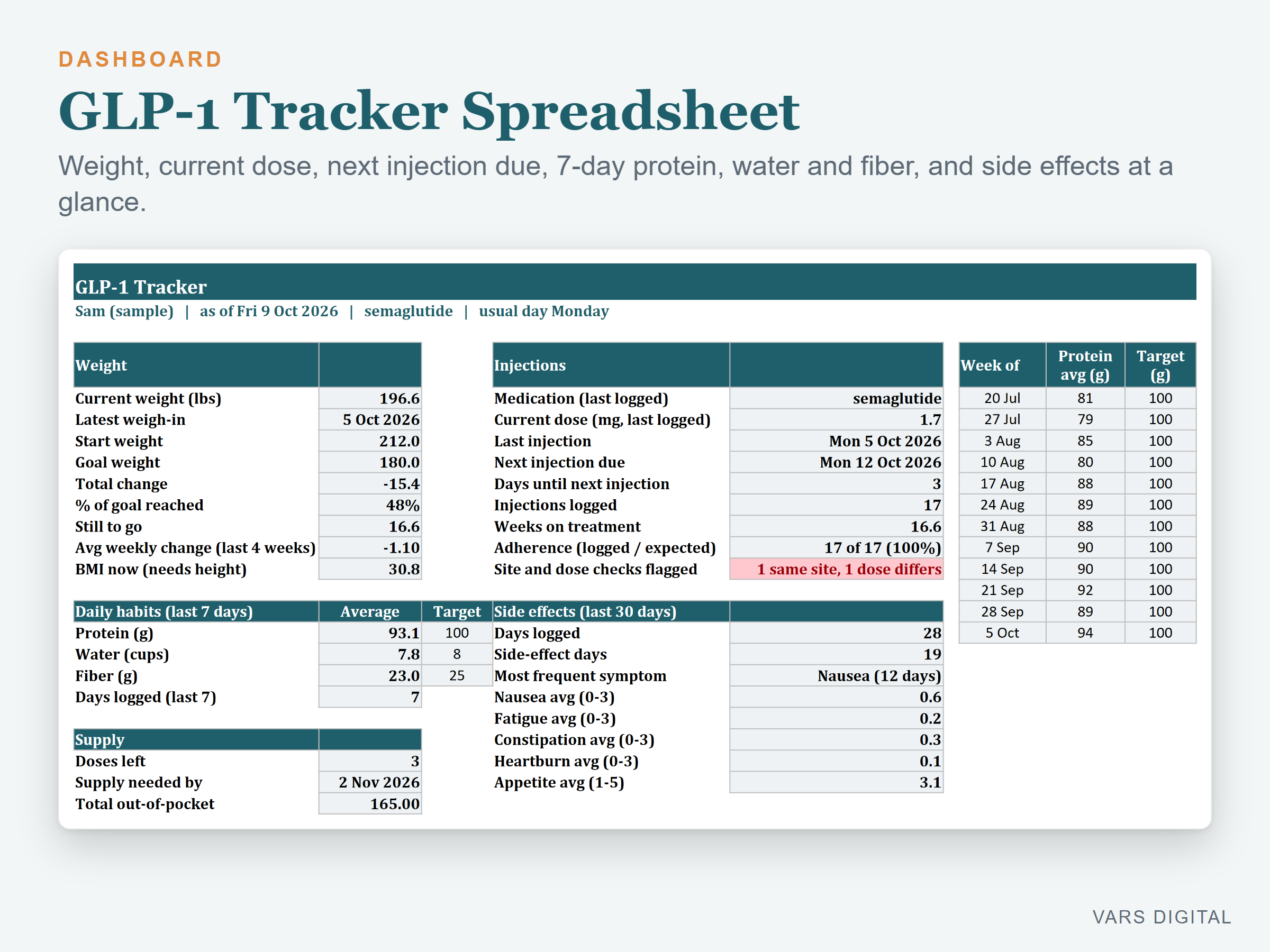
- Dashboard: current weight, total change, % of goal reached, average weekly change over the last 4 weeks, current dose, last injection, next injection due and days until, injections logged, weeks on treatment, adherence (logged vs expected), 7-day averages vs your targets, side-effect days in the last 30 days and the most frequent symptom, doses left, plus 3 charts (weight over time, dose over time, weekly protein vs target)
- Doctor Summary: one printable page with your key numbers, the dose plan you typed in and a box for questions for your next appointment
- The tabs are protected without a password, so formulas don't get typed over by accident (you can unprotect them any time)
WHAT YOU GET
- GLP1-Tracker-Spreadsheet.xlsx (blank, ready for your own logs)
- GLP1-Tracker-Spreadsheet-with-Sample-Data.xlsx (16 weeks of made-up example data for a sample person)
- Quick-start guide (PDF)
HOW YOU GET IT
Digital download. After checkout you get a download page right away, plus a receipt by email. Nothing is shipped.
COMPATIBILITY
- Excel 2016 or newer (Windows or Mac) and Excel for the web
- Google Sheets: upload the .xlsx to Google Drive, open it, then File > Save as Google Sheets
- Needs a computer or tablet with a spreadsheet app. This is not an app and it sends no reminders: you type in your own entries
GOOD FOR
Anyone on a GLP-1 medication who wants one tidy personal record of injections, weight, daily habits and side effects, and a summary page to bring to appointments. Works in lbs or kg.
PLEASE NOTE
- The workbook keeps records only. It does not recommend, calculate or change doses
- The planned dose and the dose check come only from the schedule you type into the Dose Plan
- Log injections and weigh-ins in date order, one per row
- Numbers based on today's date change every day
- Generic medication names only; add your own on the Lists tab
- The entries in the photos are made-up samples; your blank file comes empty
- For your own use; please don't resell or share the files
DISCLAIMER
This template is for personal record keeping only and is not medical advice. It does not recommend doses. Always follow your prescriber's instructions.
HOW IT WAS MADE
Designed by VARS Digital with AI-assisted tools. Every formula is checked before release, and the sample file shows each tab working.
QUESTIONS
Email varsdigitals@gmail.com and we'll help you get set up.