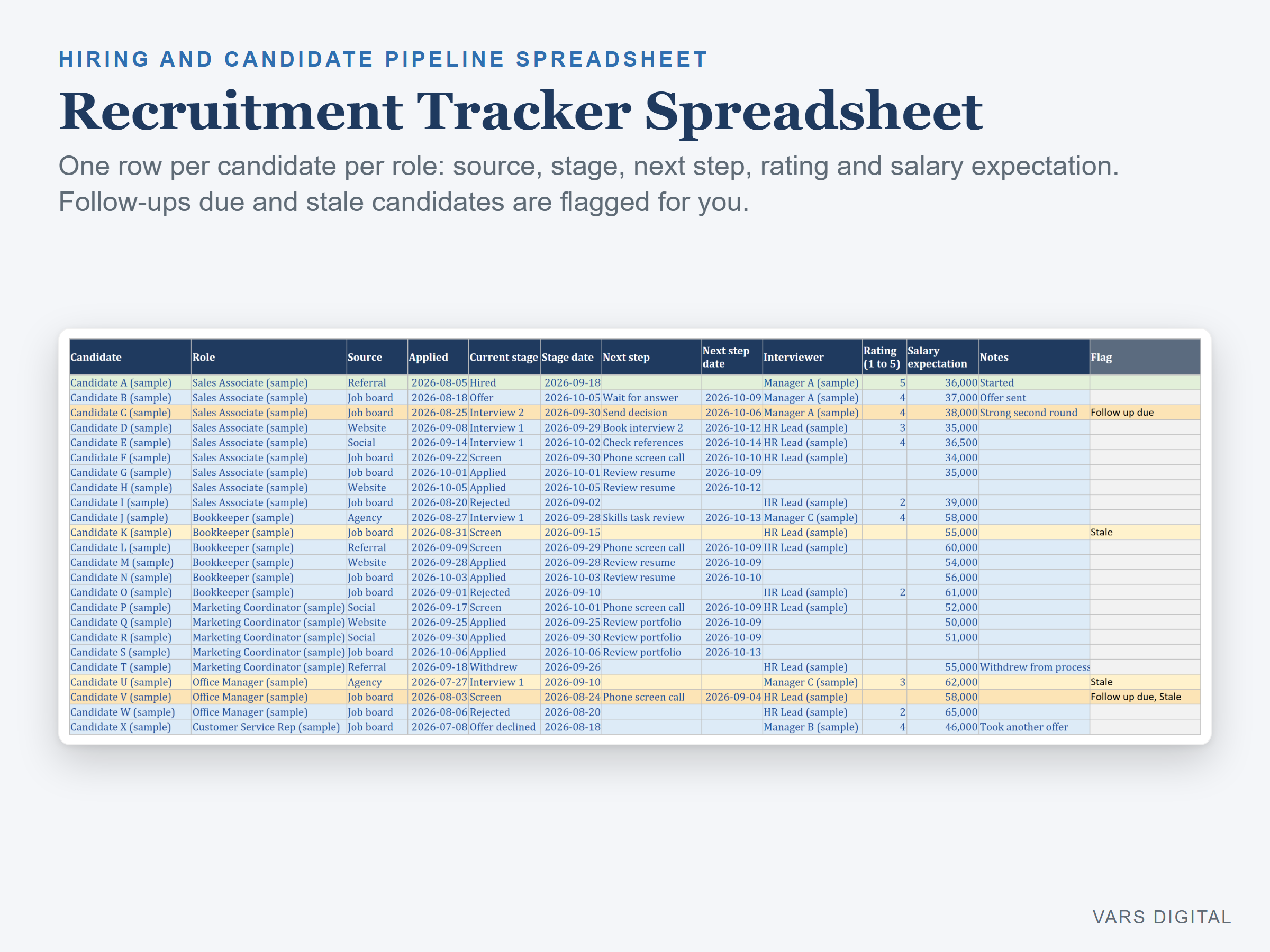
Recruitment Tracker Spreadsheet
C$12.00
Buy now
Sales tax, VAT or GST is added at checkout where it applies.
Also sold in our Etsy shop: view on Etsy
Recruitment tracker spreadsheet for the hiring side: keep your open roles and every candidate in one place, move each person through your pipeline, and see follow-ups due, stale candidates, time to hire and offer acceptance add up by themselves on a dashboard.
WHAT IT DOES
- Setup tab: your company or team name, how many days without a stage change make a candidate Stale (14 to start), up to 12 stages (Applied, Screen, Interview 1, Interview 2, Offer, Hired, Offer declined, Rejected, Withdrew to start) with Yes/No settings for active, in interview, offer made, hired and declined offer, up to 10 sources (Job board, Referral, Website, Agency, Social, Other), interview rounds, and up to 15 hiring managers and interviewers for the drop-downs
- Roles tab: up to 25 roles with department, location, hiring manager, opened date, target hire date, openings and status (Open, On hold, Filled, Closed). Days open, candidates, in interview, offers, hired, follow-ups due and openings still to fill fill in for each role, and open roles past their target hire date turn amber
- Candidates tab: one row per candidate per role (room for 500) with role, source, applied date, current stage, stage date, next step and its date, interviewer, a rating from 1 to 5, salary expectation and notes. Days in pipeline counts by itself
- Flags: Follow up due (still active and the next step date has passed) turns the row amber, Stale (still active and no stage change for 14 days, or the number you set) turns it pale yellow, and hired candidates turn green
- Interviews tab: log each interview (date, candidate, role, interviewer, round, score from 1 to 5, Yes, Maybe or No recommendation, notes), with the average score and the Yes, Maybe and No counts
- Dashboard: open roles, openings still to fill, open roles past target date, active candidates, candidates in interview, follow-ups due, stale candidates, hires this year, average days to hire (applied date to Hired stage date), offer acceptance rate (Hired / (Hired + Offer declined)), interviews logged, candidates by stage and by source (with hires per source) with two charts, and a table for each role
- The tabs are protected without a password, so formulas don't get typed over by accident (you can unprotect them any time)
WHAT YOU GET
- Recruitment-Tracker.xlsx (blank, ready for your roles and candidates)
- Recruitment-Tracker-with-Sample-Data.xlsx (a filled-in example: a made-up small business with 6 roles and 37 candidates)
- Quick-start guide (PDF)
HOW YOU GET IT
Digital download. After checkout you get a download page right away, plus a receipt by email. Nothing is shipped.
COMPATIBILITY
- Microsoft Excel 2016 or newer (Windows or Mac) and Excel for the web
- Google Sheets: upload the .xlsx to Google Drive, open it, then File > Save as Google Sheets
- Needs a computer or tablet with a spreadsheet app. This is a spreadsheet, not an applicant tracking system: it does not post jobs, read resumes, send emails or connect to other software. You type or paste the details
GOOD FOR
Small-business owners, HR generalists, office managers and agency or in-house recruiters who hire for a handful of roles at a time and want one clear list of candidates, next steps and hiring numbers.
PLEASE NOTE
- Candidate details are personal information. Keep the file somewhere secure, share it only with the people involved in hiring, and keep or delete candidate data as your local privacy law requires
- Day counts and flags use today's date, so they change each day (or type a fixed date on the Setup tab)
- A candidate who applies for two roles gets one row per role
- For your own use; please don't resell or share the files
DISCLAIMER
This template is an organizing tool, not legal, HR or employment-law advice, and does not replace advice from a qualified or licensed professional (such as an employment lawyer or HR adviser). Check your hiring and privacy obligations, and check your totals, before you rely on them.
HOW IT WAS MADE
Designed by VARS Digital with AI-assisted tools. Every formula is checked before release, and the sample file shows each tab working.
QUESTIONS
Email varsdigitals@gmail.com and we'll help you get set up.