Wedding Budget Spreadsheet
C$9.00
Buy now
Sales tax, VAT or GST is added at checkout where it applies.
Also sold in our Etsy shop: view on Etsy
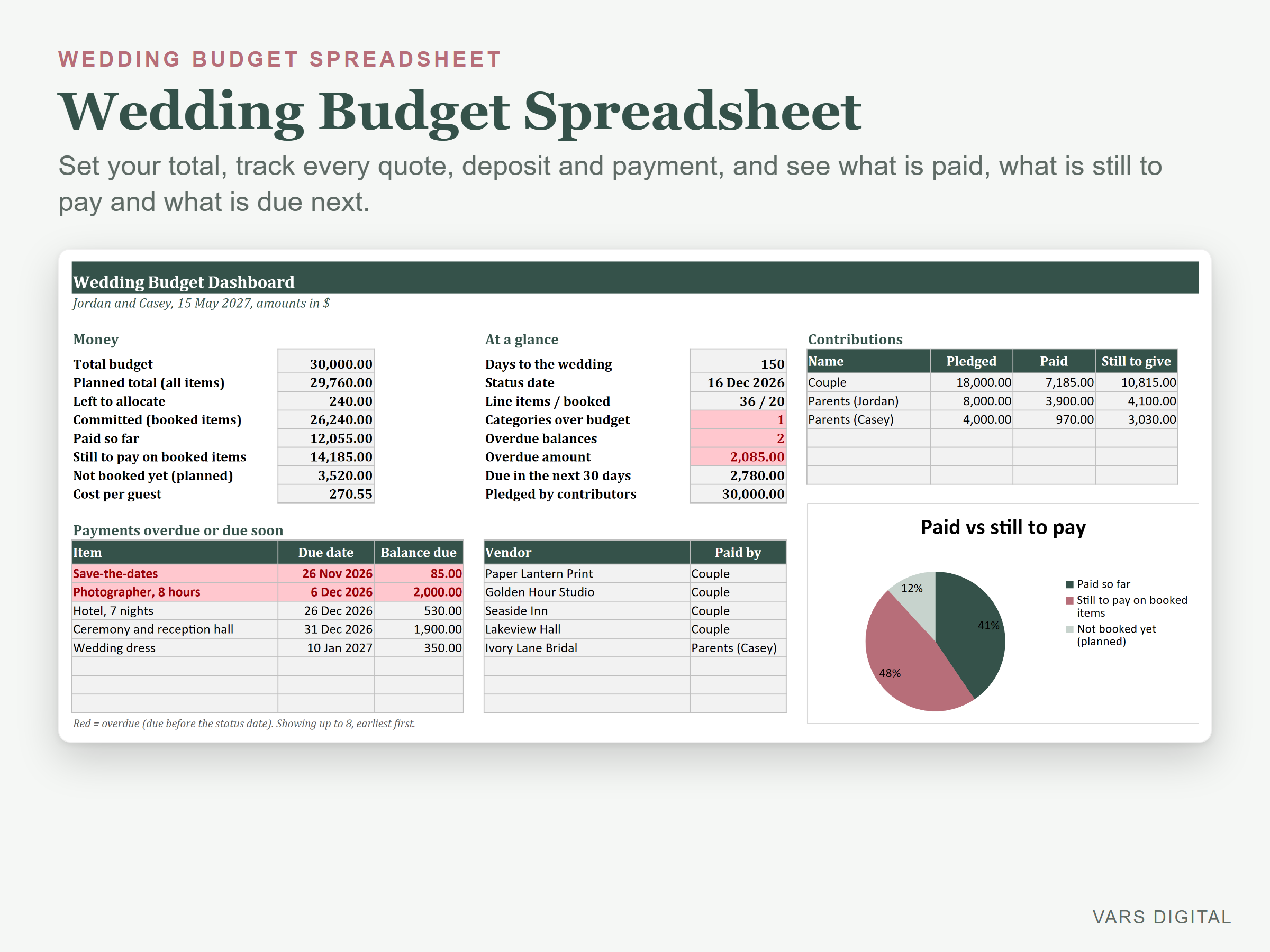
Wedding budget spreadsheet for couples (and parents helping to pay) who want every cost in one place: set your total budget, split it into category targets, and track each line item from first estimate to vendor quote, agreed price, deposit and final payment. See what is booked, what is paid, what is still to pay and when, and which categories are over budget.
WHAT IT DOES
- Setup tab: your names, wedding date, total budget, guest count, a currency label, and up to 6 people or groups contributing (for example the two of you and each set of parents) with the amount each pledged
- Category targets as a % of your total, with an editable starter split: venue, catering and bar, photography and video, attire, flowers and decor, music and entertainment, stationery, rings, hair and makeup, transport, favours and gifts, honeymoon, other and buffer (rename them or add 2 more)
- Budget tab: up to 200 line items with category drop-down, item, vendor, estimated, quoted and actual (agreed) price, planned cost, deposit paid, paid to date, balance due, next due date, who pays and notes
- Status for every item: Not booked, Booked, Paid in full, or Overdue (a balance with a due date before today, or a status date you choose)
- Payments tab: log every payment after the deposit (date, item, amount, who paid, method). Paid to date on the Budget tab adds them up by itself
- Summary tab: target, estimated, quoted, actual, planned, paid and still to pay for each category, left vs target, and an Under budget, Near limit or Over budget flag in colour
- Dashboard: total budget, planned total, left to allocate, committed, paid so far, still to pay, not booked yet, cost per guest, days to the wedding, categories over budget, overdue balances, the amount due in the next 30 days, a list of up to 8 payments overdue or due soon, contributions by person (pledged, paid, still to give), a target vs planned chart by category and a paid vs still to pay chart
- The tabs are protected without a password, so formulas don't get typed over by accident (you can unprotect them any time)
WHAT YOU GET
- Wedding-Budget-Spreadsheet.xlsx (blank, with the starter categories and split)
- Wedding-Budget-Spreadsheet-with-Sample-Data.xlsx (a filled-in example: a made-up wedding with a 30,000 budget, 36 line items and 3 people contributing)
- Quick-start guide (PDF)
HOW YOU GET IT
Digital download. After checkout you get a download page right away, plus a receipt by email. Nothing is shipped.
COMPATIBILITY
- Microsoft Excel 2016 or newer (Windows or Mac) and Excel for the web
- Google Sheets: upload the .xlsx to Google Drive, open it, then File > Save as Google Sheets
- Needs a computer or tablet with a spreadsheet app. This is not an app: you type in your own costs and payments
GOOD FOR
Engaged couples, brides and grooms to be, and parents or family helping to pay, who want one clear wedding budget with deposits, due dates and who has paid what. Works in any currency (the currency is a label you type).
PLEASE NOTE
- This is a budget-only workbook. Our Wedding Planner Spreadsheet is an all-in-one planner (a simpler budget by category plus guest list, vendors and checklist). This one goes deeper on money: line items, quotes, deposits, a payments log, due dates, overdue flags, category targets and contributions by person. It has no guest list or checklist, so please choose the one that fits
- The starting category split is a common rule of thumb, not a quote. Prices vary a lot by place, season and guest count
- Overdue and due soon use today's date unless you type a status date, so they change from day to day
- For your own use; please don't resell or share the files
DISCLAIMER
This template is a planning tool, not financial advice, and does not replace advice from a qualified professional. Check your totals before you rely on them.
HOW IT WAS MADE
Designed by VARS Digital with AI-assisted tools. Every formula is checked before release, and the sample file shows each tab working.
QUESTIONS
Email varsdigitals@gmail.com and we'll help you get set up.